Encouraging initiative in the classroom with anonymous feedback

| Bergstrom, T., Harris, A., & Karahalios, K. (2011). Encouraging initiative in the classroom with anonymous feedback. Human-Computer Interaction–INTERACT 2011, 627–642. Springer. Retrieved from http://social.cs.uiuc.edu/papers/pdfs/bergstrom-interact2011.pdf. |
BibTex
BibTex
@article{bergstrom2011encouraging,
author = {Bergstrom, T. and Harris, A. and Karahalios, K.},
date-added = {2013-01-03 22:41:13 +0000},
date-modified = {2013-01-04 09:04:23 +0000},
date-read = {2013-01-04 10:04:23 +0100},
journal = {Human-Computer Interaction–INTERACT 2011},
keywords = {0fischer},
oa-url = {http://social.cs.uiuc.edu/papers/pdfs/bergstrom-interact2011.pdf},
pages = {627–642},
publisher = {Springer},
read = {1},
title = {Encouraging initiative in the classroom with anonymous feedback},
url = {http://social.cs.uiuc.edu/papers/pdfs/bergstrom-interact2011.pdf},
year = {2011},
bdsk-file-1 = {YnBsaXN0MDDUAQIDBAUIJidUJHRvcFgkb2JqZWN0c1gkdmVyc2lvblkkYXJjaGl2ZXLRBgdUcm9vdIABqAkKFRYXGyIjVSRudWxs0wsMDQ4RElpOUy5vYmplY3RzViRjbGFzc1dOUy5rZXlzog8QgASABoAHohMUgAKAA1lhbGlhc0RhdGFccmVsYXRpdmVQYXRo0hgMGRpXTlMuZGF0YU8RAaAAAAAAAaAAAgAAB1NTREhvbWUAAAAAAAAAAAAAAAAAAAAAAAAAAMl5T9hIKwAAANrWUhxiZXJnc3Ryb20yMDExZW5jb3VyYWdpbmcucGRmAAAAAAAAAAAAAAAAAAAAAAAAAAAAAAAAAAAAAAAAAAAAAAALl1BuzQwE9FBERiAAAAAAAAIAAgAACSAAAAAAAAAAAAAAAAAAAAAHQmliZGVzawAAEAAIAADJeZYoAAAAEQAIAADNDEtEAAAAAQAMANrWUgAXPTEAAZ9eAAIAO1NTREhvbWU6VXNlcnM6AFN0aWFuOgBCaWJkZXNrOgBiZXJnc3Ryb20yMDExZW5jb3VyYWdpbmcucGRmAAAOADoAHABiAGUAcgBnAHMAdAByAG8AbQAyADAAMQAxAGUAbgBjAG8AdQByAGEAZwBpAG4AZwAuAHAAZABmAA8AEAAHAFMAUwBEAEgAbwBtAGUAEgAwVXNlcnMvU3RpYW4vYmliZGVzay9iZXJnc3Ryb20yMDExZW5jb3VyYWdpbmcucGRmABMAAS8AABUAAgAM//8AAIAF0hwdHh9YJGNsYXNzZXNaJGNsYXNzbmFtZaMfICFdTlNNdXRhYmxlRGF0YVZOU0RhdGFYTlNPYmplY3RfECouLi8uLi9iaWJkZXNrL2JlcmdzdHJvbTIwMTFlbmNvdXJhZ2luZy5wZGbSHB0kJaIlIVxOU0RpY3Rpb25hcnkSAAGGoF8QD05TS2V5ZWRBcmNoaXZlcgAIABEAFgAfACgAMgA1ADoAPABFAEsAUgBdAGQAbABvAHEAcwB1AHgAegB8AIYAkwCYAKACRAJGAksCVAJfAmMCcQJ4AoECrgKzArYCwwLIAAAAAAAAAgEAAAAAAAAAKAAAAAAAAAAAAAAAAAAAAto=}
}
Key ideas
Literature review
Lecturer speaks for more than 80% of the time, five students out of 40 dominate any classroom discussion.
Why is participation important?
Participation serves to
- let teacher better assess level of knowledge, attention etc of students, and adapt teaching
- utilize useful prior knowledge/insights of students (examples, cases, additional information etc)
- let students engage in constructivist learning
Constructivist learning
Students need to be actively engaged in their learning [1, 21].
Lecturers awareness of classroom comprehension
Skewed by students' social pressures and few speaking opportunities
- students try to present a positive image of themselves to their peers
- avoid volunteering info due to [22]
- evaluation anxiety
- fear of being judged by others for making a mistake
- or being the focus of attention
- those who speak generally self-confident or understand the material
Backchannel
- Face-to-face: yeah, uh, head nods, facial expressions, clapping, booing
Audience Response Systems
Multiple Choice
Often based on multiple choice or true/false. Often used when lecturer asks explicit MC questions [10, 19].
Challenge for lecturer to anticipate key moments to query the audience, structure the lecture to accomodate this format.
If not implemented properly, can become automated “attendance taking and quiz” interface - resented by students.
Text-based
Two challenges:
- ease of interpretation (need for attention)
- this often leaves the speaker out of the loop during the event
- danger of going off-topic
Course chatrooms [16, 23]:
- explain concepts to confused classmates, make help available, promote deeper learning
- can be tied with video recording for archival and retrieval [3]
- allow people access to initial thoughts of the audience in an asynchronous manner
Existing platforms for open public dialog:
- IRC
- instant messaging
- Twitter
- Facebook [9, 16, 18]
Writing systems:
- Classroom Presenter [2], enable students to mark directly on current slide with stylus
- Enables broad sampling of student understanding, active understanding
- Backchan.nl [6]
- audience organize collective questions for speaker in conference/after talk, includes role of moderator to filter
- Conversation Votes [11]
- participants annotated an abstract visualization of conversation with positive and negative votes to highlight agreement during conversation
- in small groups, this anonymous feedback increased the level of participation from those less satisfied with previous conversations
Affective
Quickly communicate the “mood” of the audience (using custom balls) [4]
Axis of expressivity
Distinct categories of low and high expressivity emerge
- low expressivity limit what a student can communicate, but ensure feedback can be quickly interpreted
- high expressivity allow students vast communication capabilities, but require more focused attention for lecturer and students
Own: other axis
Always on vs controlled by the presenter
Social mirror
a realtime depiction of interaction meant to augment natural face-to-face environment
Captures ephemeral moments in conversation and brings them into the public view through visualization. In our previous work, social mirrors displayed abstract visualizations to depict participation in conversation.
The resulting display of conversational dominance, non-participation, and turn taking encouraged more balanced conversation [6].
In these social mirrors, one shared visualization of conversation was projected centrally for all participants to see.
Design
Considerations
Based on idea of social mirrors, but differences:
- many more participants
- architecture of space different from layout of small group interacting around a small table
- natural asymmetry lecturer-audience
Fragmented:
- use of individual interfaces for each participant
- shortened time component, as opposed to full history present
Process
Observing active, engaged classroom of 100+ students to see what students say. Lecturers were rated as among the best in the department. Noted all student responses to understand what students want to say during class.
Categories:
- questions (on topic)
- information (adding)
- agreement/disagreement (answering lecturer's q)
- slow down/redo (procedural)
- cannot hear/repeat (procedural)
Used categories from above to group similar responses, highlight important categories of questions.
Investigate imagery:
- Three researchers independently drew graphics they felt captured messages
- 5-15 images per message
- survey of 54 CS undergrads to test icon designs
- eliminated slow down/speak up, ended up with four categories
Initial prototypes borrowed design components from Conversation Clock and Conversation Votes [5, 6], incorporated feedback into a timeline that structured the activity. Good for archival, required much attention to understand during lecture.
Product: Fragmented Social Mirror
- Java applet accessed from computer/mobile device
- Large public display in front
Input used to capture only one comment, history of feedback on public display, limited to history of most recent comments (based on needs of lecturer).
Icons
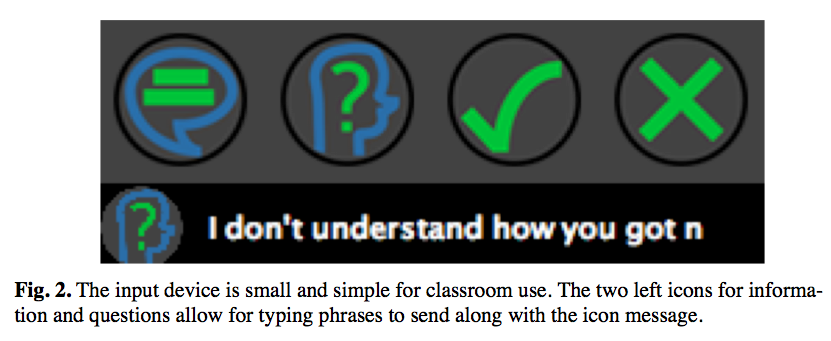
Information, Question, Yes/Agree, No/Disagree. Info and Q can be augmented by 40 character message, yes/no allow them to answer questions quickly.
Messages on public display grouped by icon, icon group with most messages on top with larger icon.
Can only send one signal every 10 seconds to not flood.
Fading
Messages fade from black to grey, before disappearing. Message count next to icon.
Rationale
- Don't want lecturers overwhelmed
- If question goes unanswered and disappears, encourage students to ask again, or raise hand (see that others want to know the same thing)
Study
- Required second year course with 180 students, instructor not affiliated with research team
- Six course sessions: three without augmentation, three with FSM.
- Average of 100 students in attendance.
- Pre-survey and post-survey on participation
- Observe student participation.
Findings
Survey
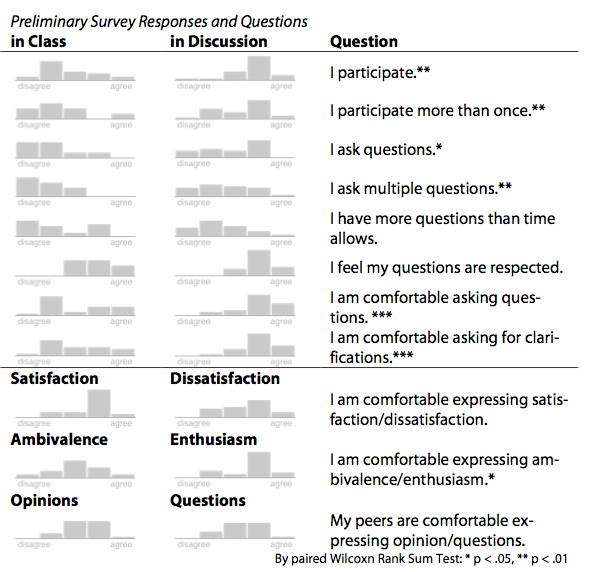
Students not comfortable asking questions or clarification during class, more comfortable in smaller recitations.
Post-survey students felt it was easier to participate in the classroom. Recognized difficulty of maintaining order, maybe make semi-anonymous.
With FSM, classrom dialog was more involved, lecturer felt she was talking to rather than at people, students took more proactive role in directing conversation to points that were not clear.
Activity
Initial sessions very little participation.
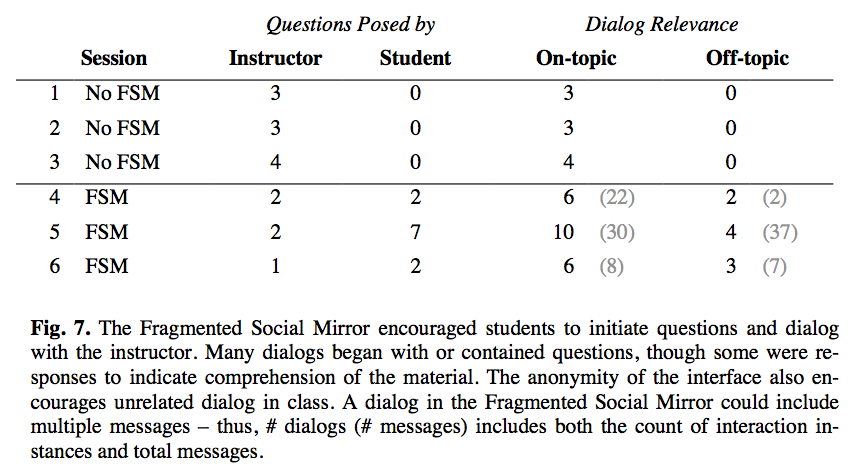
Proactive using FSM, asking questions 11 times:
- ask questions
- keep professor from moving too quickly
- answer questions posed by professor
- most on-topic messages began with or contained a question for the professor interesting axis, question from professor to students, or from students to professor... or students->students?
Abuse
In backchan.nl, some users voted up questions for humor [11].
In FSM, there were many off-topic messages.
Challenges
- distracting off-topic messages
- relevant messages that bring in new information/topics - can cause planned material to not be covered
Future research
Does FSM encourage students who are already engaged to further surpass their peers, or genuinely help students who need a small boost to get involved? (Ie. who uses it?)
Links here
Highlights (68%)
Abstract. Inspiring and maintaining student participation in large classes can be a difficult task. Students benefit from an active experience as it helps them better understand the course material. However, it’s easy to stay silent. Opportunities to participate in conversation allow students to question and learn. The Fragmented Social Mirror (FSM) provides students with the ability to anonymously initiate classroom dialog with the lecturer. The system encourages participation by enabling expressive anonymous feedback to reduce evaluation anxiety. The FSM further catalyzes participation by allowing for many simultaneous participants. In this paper, we introduce the FSM as a classroom device, discuss its design, and describe a pilot test of the interface. Initial results indicate a promising direction for future feedback systems. p. 1
Students learn more when they actively engage in the classroom [22]. However the structure of many classes ensures that the lecturer speaks for at least 80% of the time. Though some students participate, it’s expected that five students out of 40 will come to dominate any classroom discussion. The lecturer’s awareness of class comprehension is skewed both by the students’ many social pressures and the few speaking opportunities. Students try to present a positive image of themselves to their peers. Thus, they often avoid volunteering information due to evaluation anxiety, a fear of being judged by others for making a mistake or being the focus of attention [22]. It’s easy to remain silent. Those students who do speak are generally self-confident or understand the material. However, there is a reluctance to appear too engaged in the classroom. Students who raise the expectations on a group may be ostracized by their peers [17]. p. 1
The prototype, entitled Fragmented Social Mirror (FSM), aims to create a new communication channel of anonymous dialog between the instructor and the class. Unlike many previous Audience Response Systems [10, 19], FSM allows for expressive text- p. 1
based feedback and may be used throughout the lecture. In our short pilot observation, students in a large class began to initiate interaction with the professor, whereas previously they had only mumbled answers in response to posed questions. In this paper, we describe the design of the FSM in the context of other Audience Response Systems. We also discuss promising initial observations from a classroom pilot study of the FSM. p. 2
FSM is designed to extend the benefit of backchannel communication. Familiar face-to-face backchannels include “yeahs,” “uh huhs,” and head nods that show attention to the speaker. Similarly, facial expressions reveal feelings while gestures provide emphasis [15]. p. 2
Large lectures and speeches require a strong and focused mediation to centralize attention [8]. Without that centralization, small groups of 4-5 individuals form based on proximity of others. p. 2
Lack of participation makes it more difficult to assess the current understanding of students and by not encouraging participation students are less apt to risk being wrong [12]. However, from a constructivist view of learning theory, students need to be actively engaged in their learning. Students learn by actively building their own understanding of new information [1, 21]. Instruction alone does not directly allow for the construction of knowledge, however effective knowledge construction often adopts a social process between the student and the teacher [7] p. 2
Classrooms have addressed this issue by using Audience Response Systems for multiple choice and true/false questions. The interfaces in [10, 19] provide a small number of preselected responses of A/B/C/D, and a true/false response. These interfaces are most often used when the lecturer explicitly asks a multiple-choice question of the audience. To be effective, the lecturer has the difficult task of anticipating key moments to query the audience and must specifically structure a lecture to accommodate this new question-answer format. p. 2
In the worst cases, when a lecturer does not incorporate interesting interaction into the lecture, the Audience Response Systems can become automated attendance and quiz systems, which students grow to resent [14]. p. 2
Other feedback modalities such as text-based systems provide opportunities for students to engage with each other [16, 23]. Studies of dedicated course chatrooms show students will chat about the lecture’s content to help explain concepts to confused classmates [23]. However, chat rooms also encourage unrelated discussions, and potentially draw students away from the lecture. Some have gone further and tied the in-class chat discussion to a video recording of the lecture for archival and review [3]. For a practice talk or presentation, these systems allow people to access p. 2
the initial thoughts of the audience in a asynchronous manner. In addition to making help available, this style of active learning helps students communicate concepts to peers for a deeper understanding of the material. Others have brought affective computing to the classroom by using a custom handheld device [4]. This handheld ball can be used to indicate the emotional state of the student to the instructor. Outside of the classroom, text based systems similarly open public dialog into shared events through IRC, instant messaging, Twitter, and Facebook [9, 16, 18]. Though all of these side-channels can contribute to audience discussion, they often leave the speaker out of the loop during the event. p. 3
Writing systems, such as Classroom Presenter, benefit from writing as input while still including the instructor in the interaction [2]. A tablet PC system, it allows students to mark directly on the current slide with a stylus, which can then be viewed and shared by students and the instructor. Instructors can set up slides that encourage students to answer questions that can be discussed and reviewed as a group. It also allows for more expressive diagrams, images, and nonverbal communication mechanisms. This method enables a broad sampling of student understanding and encourages active participation with the material. p. 3
Related work such as backchan.nl and Conversation Votes create a new feedback channel that integrates approval feedback into group dialog [6, 11]. With backchan.nl audience members organize their collective questions for the speaker in a conference or after a talk. A moderator filters the most appropriate questions from the top rated questions. With Conversation Votes, participants annotated an abstract visualization of conversation with positive and negative votes to highlight agreement during conversation. In small groups, this anonymous feedback increased the level of participation from those less satisfied with previous conversations. p. 3
Viewed on an axis of expressivity, distinct categories of low expressivity and high expressivity emerge. Low expressivity systems as in [6, 10, 19] limit what a student can communicate, but ensure the feedback can be quickly interpreted. High expressivity systems like [2, 11] and chatrooms allow students vast communication capabilities, but can require more focused attention for both the lecturer and students. p. 3
Our work takes a middle path. FSM provides a meaningful, but constrained, set of signals to be observed alongside the lecture like low expressivity systems, but it allows expressive text to convey personal ideas as in a high expressivity system. As an always-available interface, the FSM captures the fleeting moments of confusion and conveys this information to the lecturer while it can be addressed in context. p. 3
3 The Fragmented Social Mirror p. 3
The Fragmented Social Mirror (FSM) provides feedback based on principles borrowed from our previous work in social mirrors [13]; however, the classroom setting necessitates a break from the standard social mirror design. A social mirror is a realtime depiction of interaction meant to augment natural face-to-face environment. It captures ephemeral moments in conversation and brings them into the public view through visualization. In our previous work, social mirrors displayed abstract visu- p. 3
alizations to depict participation in conversation. The resulting display of conversational dominance, non-participation, and turn taking encouraged more balanced conversation [6]. In these social mirrors, one shared visualization of conversation was projected centrally for all participants to see. On a classroom or large lecture scale, this form does not function as well. There are many more participants involved, and the architecture of the space is different from the spatial layout of small group interaction around one shared table. Furthermore, there is a natural asymmetry in participation due to the lecturer-audience dynamic. This results in less interaction between the lecturer and the audience not suited to the traditional social mirror visualizations. p. 4
The term “fragmented” in FSM refers to the use of individual interfaces for each participant as opposed to one shared visualization and the shortened time component as opposed to the full history present in previous social mirrors. In our setup, each participant accesses a Java applet from his or her computer or mobile device, while a large public display is presented to everyone. Furthermore, while a traditional social mirror maintains a persistent history of interaction, FSM highlights questions and comments that are pressing at the specific moment. p. 4
The process of designing the FSM began by observing an active and engaged classroom of 100+ students to see what students say when engaged in an active class. The lecturers of these classes were generally rated as among the best in the department. They were engaging during lecture and good at encouraging student participation. To facilitate more participation the lecturers posed a question and waited for responses - thus guaranteeing an answer or a question for clarification. We noted all the types of student responses to better understand what a student wants to say during class. The responses were narrowed down to the following list of categorical responses: p. 4
- Questions: Students provide new questions based on what has just been taught.
- Information: Students add their own connection to outside subjects.
- Agreement/Disagreement: Answering a Lecturer’s question.
- Slow Down/Redo: Students did not understand the lecturer.
- Cannot Hear/Repeat: Students did not hear the lecturer. p. 4
Our list was very similar to feedback available in other work to mark up a presentation slide [20]. We began to investigate this set of six messages for our prototypes. These six messages would serve as categories with the ability for students to include a short text message for explanation. The message categories serve as a means to p. 4
identify and group similar responses and highlight important categories like questions. In parallel with our interface design, we investigated imagery for each of these six categories of messages (described in the next section). Due to this process, “Slow Down/Redo” and “Cannot Hear/Repeat” were eliminated. Suitable icons could not be found and they easily be replaced by an “Information” message with appropriate text. p. 5
Many of our initial interface prototypes borrowed design components from the Conversation Clock and Conversation Votes [5, 6], they incorporated the feedback into a timeline that structured the activity throughout the session. In some cases, we included indications of speaker. Much like a standard instant messenger, the full history of messages could be read through at any time. These interfaces showed potential for the review of archival classroom data, but did not serve our purpose of encouraging classroom interaction. These prototypes, tested amongst our own group, required too much attention to adequately understand. p. 5
After refining the initial prototypes, we settled on a simple interface students could use without pulling their attention too far from the lecturer. Thus the input of the FSM was used only for capturing one comment. The history of feedback was only seen on the public display and limited that history to the most recent comments. Additionally, the needs of the lecturer necessitated this type of design. The lecturer needed to be able to read feedback from the hundreds in the audience while still being able to teach effectively. In past studies, a social mirror was primarily viewed by the listeners (and not the speaker) in conversation because they had more free attention [5]. In this design, the captured feedback of conversation is significantly pared down, so that the lecturer can receive the benefits from the social mirror with minimal attention. Therefore, current comments/questions are displayed so as not to overwhelm the viewers with a long history. p. 5
The FSM interface passes information through icons. These graphics serve to simplify the message so that the lecturer might easily understand the classroom without reading too much content. Based on informal observation of classroom sessions and prior work [20], we designed icons based on the messages earlier: “I have a question,” “I have information/an answer,” “Yes/agree,” “No/disagree,” “Speak Up,” “Slow Down.” Three researchers independently drew any graphic that they felt reasonably captured these messages. We combined them into sets for each category, with a total of 5–15 images for each message. p. 5
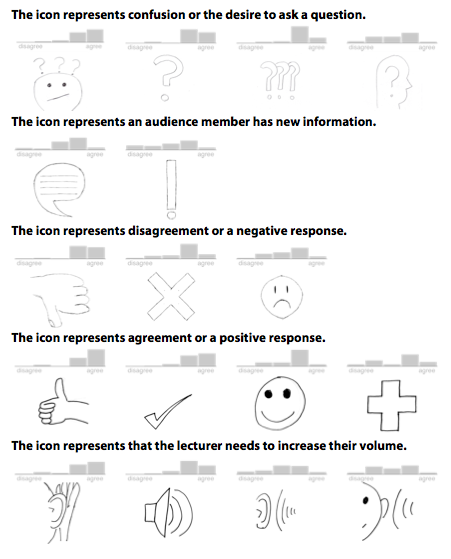
We conducted a survey of Computer Science undergraduates to test our icon designs. A total of 54 Computer Science undergraduates completed our survey. Their feedback identified 17 icons that convey the intended message. Figure 1 shows all 17 icons. None of the icons for “Slow Down” conveyed an adequate message to the student. We eliminated this message, as well as the “Speak Up” messages in favor of a simpler 4-icon interface. Students can use the Information and Question messages with additional text to signal “Slow Down” and “Speak Up.” p. 5
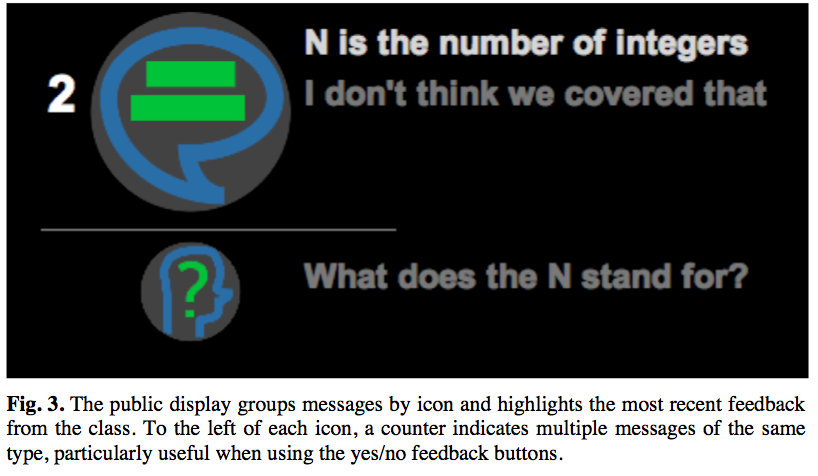
There are two FSM interfaces — the student’s client interface for a computer or handheld device (Figure 2) and a larger public screen for the lecturer and audience (Figure 3). The public display is situated in the front of the room, though the lecturer sees the public display on a personal screen. The four different preselected icons categorize student responses in the student interface. The icons represent: Information, Questions, yes/agree, no/disagree. Of the four categories or signals, the Information and Question signals can be augmented by a 40-character message. The short messages allow students to clarify their questions or possible answers when there is no opportunity to speak while the yes/no buttons allows students to answer simple questions quickly. p. 7
All messages on the public display are grouped by their associated icon to increase legibility for the speaker. The speaker can look up and see many questions that need to be addressed or they can glance over answers that p. 7
students provided via the display. p. 8
The icon group with the most messages moves to the top of the screen with a larger icon. The most recent message of this icon appears at the top of that icon in white text set against the black background. As a message ages, it fades to grey before finally disappearing after a pre-configured time. For icons with multiple messages, a count is displayed to the left of the icon. p. 8
Messages on the public display are limited to recent messages. Only the most recent minute of activity is visible; each message fades in brightness over the minute before disappearing from view. The rationale for this design was two fold: (1) we did not want the lecturers to be confused or overwhelmed by reading old questions from a prior part of the lecture and (2) if a question goes unanswered and disappears, this removal may encourage a student to verbalize the question in class or to repost it. One of our main goals is to encourage more class interaction. If a student can “see” that they are not alone in their confusion, they may be less apprehensive to speak out and ask a question. p. 8
Once a student sends a signal via posting an icon, they are blocked from sending additional signals for a brief period (10 seconds in our pilot) to discourage excessive social chatter and monopolization of the channel. While there is some room for abuse as with the backchan.nl system, where some users voted up questions for humor [11], the public availability of the channel is ultimately at the discretion of the lecturer. p. 8
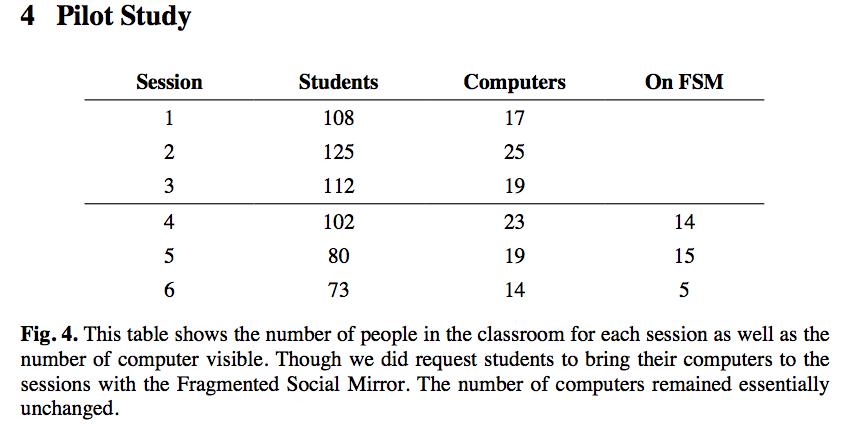
We conducted a pilot study to investigate the FSM in the classroom. We began by observing the participation levels before the introduction of the FSM and again with the FSM in place. For this, we observed a required second year course with roughly 180 registered students at the beginning of the semester. The instructor was not affiliated with our research team. We observed a total of six course sessions: three initially without any augmentation, and three with the addition of the FSM. During observation, an average of 100.0 students were in attendance, though there were p. 8
Prior to testing the FSM in class, we sent a pre-survey and described the use of the FSM. The survey inquired about the student's comfort level while participating in class versus their smaller discussion sections. Feedback from the survey confirmed that students are not comfortable asking questions or asking for clarification during class, though they are more comfortable asking in their smaller recitation sections. Similarly, they recognize that they do not participate or ask questions during class (Figure 5). p. 10
Our initial observations showed little interaction between audience and lecturer over the course of three 50-minute sessions. The only activity from the audience was in response to questions posed by the lecturer. For example, students were asked “n is divisible by what?” and “What is the cardinality of set Q?” in reference to a proof. The class averaged about four responses per class. The students initiated zero interactions themselves, five of the twelve responses were general indefinite murmurs from the class, and two responses involved raising hands. Various sets of 1–3 unidentified students spoke up to answer the remaining six questions. p. 10
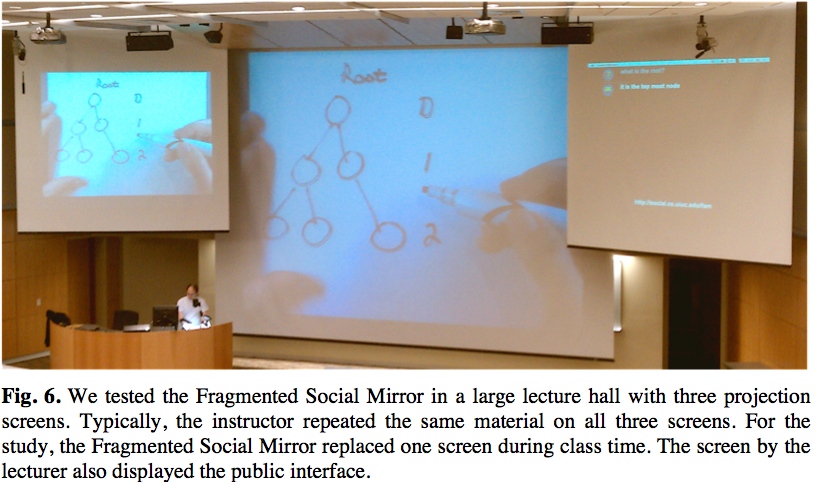
We tested the FSM in three class sessions and found the students were proactive in using the system. In the classroom, the lecturer used a central projection screen to work through problems by hand while a smaller screen displayed the public display to the right of the larger screen (Figure 6). At the lecture podium, the lecturer also had a copy of the public display available during the class activity. p. 10
With the system in place, Students initiated dialog with the lecturer by asking questions 11 times, compared to zero without the system. When on topic, students used the Fragmented Social Mirror to ask questions of the professor, keep the professor from moving on too quickly, and to answer any questions the professor posed. Figure 7 summarizes the participation in each of the 6 classes. Most of the on-topic dialogs either began with or contained a question for the instructor. They lead to discussions with the instructor and information to enrich the class. However, there p. 10
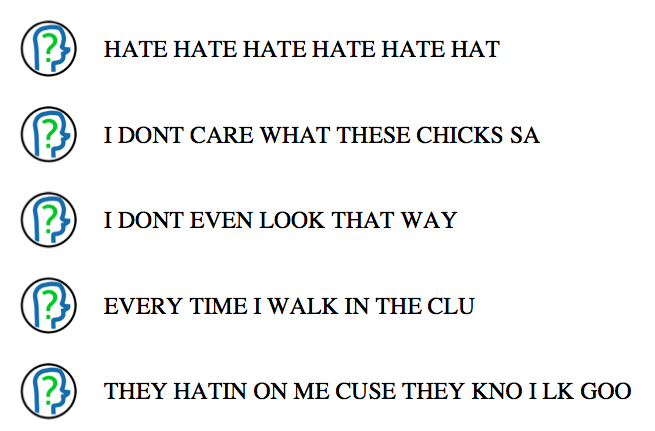
were also many off-topic messages. These messages were irrelevant to the class topic and were used to draw the attention of other classmates away from the lecture material for their own entertainment. p. 11
Example FSM Dialogs p. 11
In this first example, students requested information that the professor was not trying to teach but established an interesting aside on history related to the lesson: p. 11
Possibility of getting off topic - stuff that is interesting but wasn't planned to be covering. Problem if lecture is planned very tight - going off topic means planned topics must "fall out" p. 11
However, with the addition of initiating comments, there was also an increase in comments solely intended to draw attention away from lecture. These messages often had nothing to do with the lecture or a question tended to come in bursts in order to overwhelm the public display for a short time. As an example of such a burst: p. 12
The lecturer was inclined to read them, see that they were not relevant and either laugh, if it were funny, or state “I don’t know what this means.” However, the increase of messages also meant that the lecturer was more likely to miss relevant exchanges where a student was asking for help: p. 13
We had only planned to gather initial observations to refine the system in these first sessions; however, the instructor was excited to see the students participating and invited us to return with the system for further studies. After the lectures, she indicated that it's always been hard to get this many students to say anything, even with encouragement. The simplicity of the display was also deemed useful, as she could read the questions with a glance. Additionally, the asynchronous nature allowed students to ask their questions while she was still explaining — thus allowing her to work the question into that explanation or come back to it later. Student feedback indicated the device was useful as they “didn't have to try to get the professors attention” by raising a hand from the back of the lecture. p. 13
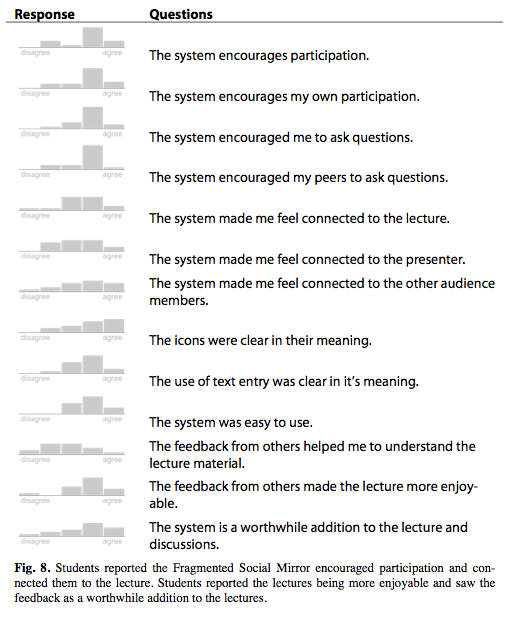
Students also saw the benefit of the interface, and felt it was easier to participate in the classroom (Figure 8). However, they recognized the difficulty of maintaining order in the anonymous display and provided suggestions to keep the interface on topic. One such suggestion was to make the display semi-anonymous; implement a publicly anonymous interface that retains the identity on the lecturer's display. In this way the instructor could call out any abuse of the display, while protecting the identity of any others who were uncomfortable commenting in front of the class. A similar suggestion would simply log the identities for review after class. p. 13
In the sessions with the FSM, the classroom dialog was more involved. The lecturer felt like she was talking to people rather than at people while the students took a more proactive role in directing conversation to points that were not understandable. With 100 students, evaluation anxiety limits the individuals willing to speak - however we have shown that anonymous feedback can break the barrier and include more students. p. 14
The Fragmented Social Mirror indicates that the use of text based anonymous feedback has potential for promoting engagement in the classroom. A long term study could investigate the effects on learning outcomes: does the FSM encourage students who are already engaged in class to further surpass their peers, or does it genuinely help students who just need a small boost to get involved? p. 16
7 References p. 16
2. Anderson, R., Anderson, R., Davis, P., Linnell, N., Prince, C., Razmov, V., and Videon, F. Classroom Presenter: Enhancing Interactive Education with Digital Ink. Computer. 40(9):56-61. 2007. p. 16
3. Baecker, R., Fono, D., Lillian, B., and Collins, C. Webcasting made interactive: persistent chat for text dialogue during and and about learning events. Proceedings of the 2007 conference on Human interface: Part II. 2007. p. 16
5. Bergstrom, T. and Karahalios, K. Seeing More: Visualizing Audio Cues. Proceedings of Interact. 2007. p. 16
6. Bergstrom, T. and Karahalios, K. Vote and Be Heard: Adding Back-Channel Cues to Social Mirrors. Proceedings of Interact. 2009. p. 16
9. Ebner, M. and Reinhardt, W. Social networking in scientific conferences - Twitter as tool for strengthen a scientific community. In Proceedings of the 5th EduMedia Conference. 2009. p. 16
10. Fitch, J. L. Student feedback in the college classroom: A technology solution. Educational Technology Research and Development. 52(1):71-77. 2004. p. 16
11. Harry, D., Green, J., and Donath, J. Backchan.nl: integrating backchannels in physical space. Proc. of CHI. 2009. p. 16
13. Karahalios, K. and Bergstrom, T. Social Mirrors as Social Signals: Transforming Audio into Graphics. IEEE Computer Graphics and Applications. 29(5):22-32. 2009. p. 16
14. Kay, R. H. and LeSage, A. Examining the benefits and challenges of using audience response systems: A review of the literature. Comput. Educ. 53(3):819-827. 2009. p. 16
15. Krauss, R. M., Garlock, C. M., Bricker, P. D., and McMahon, L. E. The role of audible and visible back-channel responses in interpersonal communication. Journal of Personality and Social Psychology. 35(7):523-529. 1977. p. 16
16. McCarthy, J. F. and boyd, d. m. Digital backchannels in shared physical spaces: experiences at an academic conference CHI '05: CHI '05 extended abstracts on Human factors in computing systems. 1641-1644. 2005. p. 16
18. Shamma, D. A., Kennedy, L., and Churchill, E. F. Tweet the debates: understanding community annotation of uncollected sources WSM '09: Proceedings of the first SIGMM workshop on Social media. 3-10. 2009. p. 17
19. Stowell, J. R. and Nelson, J. M. Benefits of Electronic Audience Response Systems on Student Participation, Learning, and Emotion. Teaching of Psychology. 34(4):253-258. 2007. p. 17
20. VanDeGrift, T., Wolfman, S. A., Yasuhara, K., and Anderson, R. J. Promoting Interaction in Large Classes with a Computer-Mediated Feedback System. University of Washington, Computer Science and Engineering. 2002. p. 17
21. von Glasersfeld, E. Cognition, Construction of Knowledge, and Teaching. History, Philosophy, and Science Teaching. 80(1):121-140. 1989. p. 17
22. Weaver, R. R. and Qi, J. Classroom Organization and Participation: College Students' Perceptions. The Journal of Higher Education. 76(5):570-601. 2005. p. 17
23. Yardi, S. Whispers in the Classroom. In Digital Youth, Innovation, and the Unexpected, T. McPherson,Ed 2008. p. 17
Images
p. 6
p. 7
p. 7
p. 8
p. 9
p. 10
p. 11
p. 12
p. 14

