# tag-extract: A tool to automatically restructure text/outline using tags
***I created a tool that can reorganize an outline in text format with
simple @tags, using the hierarchical format of the file to
"intelligently" group subcategories together, and tag lines with their
top-level category. I provide examples of how this can be used for a
literature review, or for qualitative research.***
**Moving ideas around**
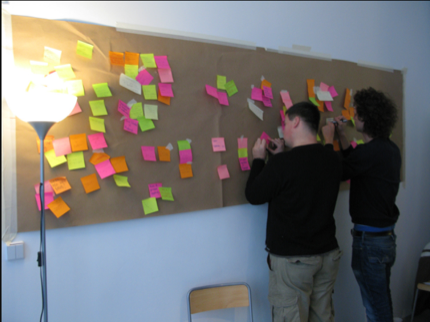
I've long been interested in ways of working with ideas, texts, and
notes – collecting them and reorganizing them – see for example
[[grappling\_with\_ideas-the\_paper\#manipulating\_ideas|my section on
this]] in [[grappling\_with\_ideas-the\_paper|"Grappling with ideas"]].
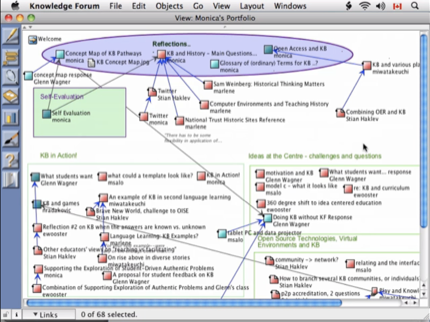
My experiences with Knowledge Forum (mentioned in the link above) taught
me the importance of being able to "move ideas around", rather then
having them fixed wherever they happened to be first entered. I've also
been very inspired by experiences in physical workshop settings, writing
down ideas on sticky notes and moving them around as new categories
emerged, for example.
But in fact, this goes further back then that. I remember in my first
year as an undergraduate, as we had to read papers, and write essays,
and I gradually developed a technique of studying that fit my own style.
I never liked using yellow markers on our reading packages, because I
felt that these highlights would be "trapped" inside the different
papers. Instead, I would read the papers and take copious notes on my
laptop, in a very informal manner, with many abbreviations, for example:
```
Johnson (1999)
p 5. diff. betw. CIDA and USAID
p 6. USAID & support US farmers
p 11. food aid -> depressed food
prices in dev'l countries (see Wilkensky), IMF
```
In this way I quickly captured the important points of the article, and
in a format which was "fungible". Later, when I sat down to write the
paper for class, I would have several text edit windows, create
headings, and copy lines over to different topics, for example:
```
Corruption:
Johnson 1999 p 6. corruption decreases
mostly linearly with GDP growth
Peterson 2011 p 17. corruption is linked to
social history, and not connected to economic growth
Good governance:
Alfanski, 1997 p 10. good governance became
an IMF priority in 1990's
```
etc.
([here](http://reganmian.net/blog/wp-content/uploads/2012/06/NotesPOLB90-2004.pdf) are
the actual notes I took for the essay back in 2004). This took a while,
and was all manual - I copied the individual lines, and had to add the
article they came from. But the advantage was that once I had gone
through and classified all my notes like this, I then had my "outline",
and could write my article, first writing about corruption, and quickly
able to insert the relevant citations, then about good governance, etc.
I remember fantasizing about creating a tool which would let me tag a
text string with the property of being from a certain publication, and
when I copied a part of that text to another place, that "property"
would follow the text, kind of like how you mark a paragraph as blue,
and when you copy a few words from that paragraph and put them somewhere
else, those words stay blue. Little did I know that I would create a
tool to essentially do that (although slightly differently), 8 years
later.
**Using tags to move things around**
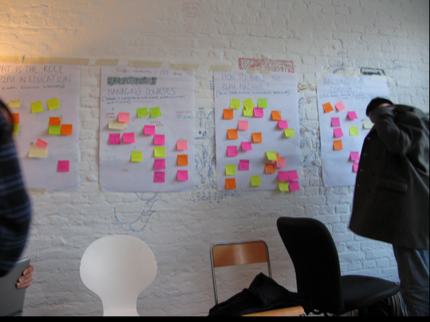
The example of a workshop with sticky notes, and Knowledge Forum, are
both examples of "graphical interfaces" where you can literally move
ideas around, and organize knowledge spatially. I find these kind of
interfaces very fascinating (although ironically, I don't regularly use
any concept mapping, mind mapping or other graphical idea tool).
However, for someone who likes hacking, one of the challenges for me is
that it's much easier to write tools to process straight text, than it
is to program a graphical interface.
[](http://reganmian.net/blog/wp-content/uploads/2012/06/Screen-Shot-2012-06-13-at-09.51.11.png)
I first had the idea of using tags to help us reorganize ideas, and make
them "fungible" when thinking about
[Pepper](http://innovations.oise.utoronto.ca/edtech/index.php/Knowledge_eCommons_2.0)
(formerly Knowledge eCommons), a discussion forum tool developed at
OISE, and how we could more easily work with the ideas posted, and
reorganize them (for example going back after five weeks of discussions,
captured in five weekly forums, to extract all the posts about a certain
topic into a new forum, to continue the discussion there). This made me
realize that tags could be used in
many different ways. If I tag a blog post immediately upon writing it,
or a Flickr photo immediately upon uploading it, it's an example of a
folksonomy. It doesn't use a
controlled vocabulary, so there might be some photos tagged "Istanbul",
some tagged "Turkey", some tagged "Стамбул" etc, and the person tagging
also has to try to "predict" which words a future user will search for.
Contrast this with for example tags on Twitter. Often times, these
function more as channels (and indeed the \# symbol comes from the
channel prefix used on [IRC](http://wikipedia.org/wiki/IRC)). If I tag
something with [\#oa](https://twitter.com/#!/search/%23oa), I know that
a number of people have saved searches for \#oa because they are
interested in Open Access. This becomes even more clear when you're
attending a conference that has designated an official Twitter hashtag.
In many ways, this is like a global "category", more than a folksonomy
tag.
So with regards to the discussion forum, my idea was not for people to
try to predict what people were going to be searching for in the future,
and tag messages immediately as they wrote them. Instead, people would
revisit the group's writings after a certain period, and find certain
emerging topics. They could then apply a tag to messages that they
wanted to "collect", and a new saved search would automatically be
created for this tag, where all messages could be seen together, and the
discussion could continue.
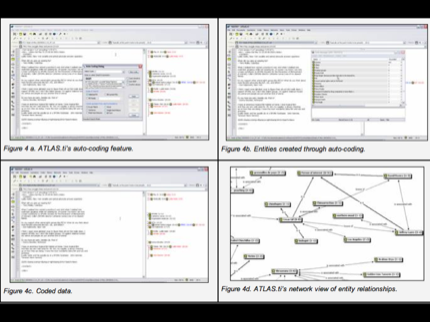
In many ways, this concept of emerging ideas or categories reminds me of
grounded qualitative analysis, when someone is coding a bunch of
interviews, and reads them over and over again. He or she doesn't start
out with set categories, but gradually certain trends emerge, and the
different statements are sorted - whether by moving piles of cut-up text
slips, or using some kind of qualitative research software.
This is again quite similar to the process of doing a literature review.
You start by identifying a large amount of articles in a specific field,
and through reading them you start identifying certain trends or
categories. Then you need to move and organize your notes according to
these trends, before you can start writing the actual literature review
article.
**Building the tool**
With all this in the back of my mind, I was working on a literature
review of research on open courses (there have been many articles on
Open Educational Resources, but very few on open learning interactions).
I began finding and adding PDFs to my
system, reading them and
extracting highlights, adding high-level notes using
[sidewiki](http://reganmian.net/blog/2012/05/10/using-web-clipping-and-sidewiki-to-gather-and-synthesize-information/).
But I was left with a long list of individual article notes - how to
turn this into one document?
On a hunch, I decided to try to use
[Taskpaper](http://www.hogbaysoftware.com/products/taskpaper), a
text-based outliner, to take very brief notes from each paper (also
capturing the citekey as
header). Part of the file ended up looking like this
[](http://reganmian.net/blog/wp-content/uploads/2012/06/Screen-Shot-2012-06-13-at-10.46.59.png)
Now I at least had all the notes in one file, as opposed to spread over
forty wiki pages. But still, I had to do what I did when writing the
political science article in 2004, copy and paste lines from each
article to sort similar ideas together. I decided that if I could just
tag lines with the name of the grouping, and have a script move the
lines for me, that would speed the process up considerable. So I wrote
[tag-extract](https://github.com/houshuang/folders2web/blob/master/tag-extract.rb).
Taskpaper makes tagging even easier by automatically recognizing words
after @ as tags, color coding them red, and enabling tag-completion
based on the tags you've already created.
[](http://reganmian.net/blog/wp-content/uploads/2012/06/Screen-Shot-2012-06-13-at-10.50.59.png)
I further realized that given the structure of this text file, there
were two things that the script could assume. The first was that every
line below a cite key like [@weller2007distance] "belonged" to that
citekey, so it could automatically append this citekey to tagged lines.
Secondly, text indented below a line in a certain sense "belongs" to
that line, so if that line gets tagged, all the text indented below
should be included as well. In the example below, the entire list of
theories will be copied to the section called "theory", but certain
lines in the list will also be copied to other tags, like "connectivism"
and "andragogy".
[](http://reganmian.net/blog/wp-content/uploads/2012/06/Screen-Shot-2012-06-13-at-10.53.49.png)
When it comes to output formats, I so far added three different output
formats (although it would be easy to add other ways of formatting the
text). The simplest one is a new indented text file, which can be read
by Taskpaper or even a normal text editor.
[](http://reganmian.net/blog/wp-content/uploads/2012/06/Screen-Shot-2012-06-13-at-10.57.31.png)
Above you see two tags from the output file, @soc\_contract and
@metalearning, underneath you see the lines tagged, and the citekeys
they came from. Below, you see the same section in a text editor
(Taskpaper works on pure text files, it simply recognizes and
auto-formats certain aspects).
[](http://reganmian.net/blog/wp-content/uploads/2012/06/Screen-Shot-2012-06-13-at-11.00.06.png)
In addition, you can output with Dokuwiki markup, and
[here](https://roamresearch.com/#/app/stian-research/page/DVhmzMy8T) you can see my
entire literature review notes, sorted.
[](http://reganmian.net/wiki/litreview_raw_sorted)
However, to me it was really the final format that made all the
difference. My favorite tool for authoring academic texts is
[Scrivener](http://www.literatureandlatte.com/scrivener.php), and I used
it to write both my [BA honors
thesis](https://tspace.library.utoronto.ca/handle/1807/10319) and [my MA
thesis](http://reganmian.net/top-level-courses), as well as a number of
articles. From my MA thesis, I even published [all the raw notes from
Scrivener](http://reganmian.net/blog/2011/05/18/all-the-raw-notes-from-my-ma-thesis-chinese-national-top-level-courses/).
The great thing about Scrivener is that you can easily keep all your
notes in the same document as your actual text, and view both the text
for a section you are writing, and the notes for that section, in a
split screen window. So I created an export format that generates a
folder with one text file for each tag.
[](http://reganmian.net/blog/wp-content/uploads/2012/06/Screen-Shot-2012-06-13-at-11.09.54.png)
This can then be dragged and dropped onto a Scrivener document.
[](http://reganmian.net/blog/wp-content/uploads/2012/06/Screen-Shot-2012-06-13-at-11.11.14.png)
...and you can start writing. You've got all your notes, separated into
sections which corresponds to the sections you are going to be writing
in the actual document, and you've got the citekeys, which you can just
insert directly into the draft. Here's an example of my writing the
literature review.
[](http://reganmian.net/blog/wp-content/uploads/2012/06/Screen-Shot-2012-06-13-at-11.16.38.png)
Once you are finished writing, you can export the Scrivener document
back to Dokuwiki, which formats it nicely and renders all the citekeys
as proper citations (you can see the [current, very early
draft](https://roamresearch.com/#/app/stian-research/page/3L_jr2OF9))
[](http://reganmian.net/blog/wp-content/uploads/2012/06/Screen-Shot-2012-06-13-at-11.18.50.png)
...with an automatically generated bibliography...
[](http://reganmian.net/blog/wp-content/uploads/2012/06/Screen-Shot-2012-06-13-at-11.19.06.png)
All in all, a very neat workflow. The [script
itself](https://github.com/houshuang/folders2web/blob/master/tag-extract.rb) is
not very advanced (although it still took me a bit of fiddling to get it
all to work), but I really like the way it lets me work. It's fairly
decoupled from researchr, so it should be quite easy to get it to work
for others as well (note, it requires Ruby 1.9.1 because of the way I
did the regexps).
I made two screencasts to show how this works, the first is a brief five
minutes, and shows the basic functionality of the tagging with two
examples, one a literature review, and the second coding interviews
(given my thoughts of how this overlaps with qualitative research -
although I'm not claiming that this is a competitor to ATLAS.ti exactly)
The second is a longer 18 minutes, and goes through the entire process
of creating a literature review, starting with extracting information
from articles, and ending with publishing it back to the wiki. It
showcases much of the functionality of researchr, but with a much more
task-specific focus than [my first
screencast](https://vimeo.com/25295002), almost a year ago.
Stian
//Update, on January 31, 2020, I changed the links to the literature review to point to Roam Research, where I've imported them. My wiki is no longer online, but all the information is in that Roam Research database.//